Smart Blinds and Automated Shading: How They Work With Building Controls
Smart blinds, curtains and automated solar shading systems can respond to changing conditions within and around a building.
Depending on the controls specified, this can include sunlight, internal light levels, temperature inputs, occupancy, time schedules or commands from a wider building management system.
The controls can range from simple local automation for one room to zoned systems operating across a floor, façade or entire building.
For architects, M&E consultants, contractors and facilities teams, understanding these different control levels helps you decide how shading should operate and how early it needs to be coordinated with the wider building design.
Where blinds need to communicate with central building controls, our BMS blind control and integration service covers the specialist coordination required for commercial projects.
What Are Smart Blinds and Automated Shading?
Smart blinds are motorised blinds that can be controlled automatically using programmed logic, sensors, schedules or signals from other building systems.
The same principle can apply to motorised curtains and other movable shading systems.
The level of control can vary considerably between projects.
A blind operated from a wall switch is motorised.
Add a timer or sensor and it can operate automatically.
Connect groups of blinds into a wider building controls strategy and they can respond alongside systems such as lighting or HVAC.
The motor provides the physical movement. The controls determine when the blind moves, where it moves to and whether it operates individually, as part of a zone or through a central control system.
For information on the blind systems themselves, see our range of commercial motorised blinds.
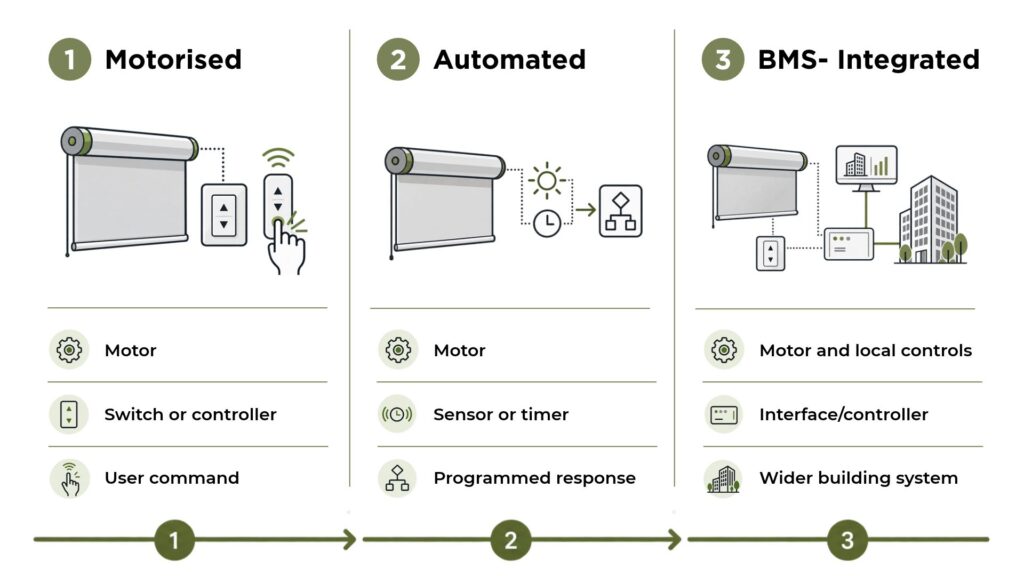
Motorised, automated and BMS-integrated shading
|
Motorised shading |
Automated shading |
BMS-integrated shading |
|---|---|---|
|
A motor moves the blind or curtain |
Controls trigger movement automatically |
Shading forms part of wider building controls |
|
Usually operated by switch, remote or controller |
May respond to sensors, timers or programmed logic |
May receive or exchange commands through suitable interfaces |
|
Can operate independently |
Can control individual blinds or groups |
Can coordinate with systems such as lighting, HVAC or central schedules |
|
Suitable where powered operation is required |
Suitable where conditions or schedules should influence operation |
Suitable where shading forms part of a building-wide control strategy |
The exact control architecture depends on the motor, controller, sensors, interfaces and building-control platform selected for the project.
If you are still considering whether powered operation is appropriate, our guide to the benefits of motorised blinds looks more broadly at where motorisation can help.
How Does Automated Shading Work?
An automated shading system takes an input, processes it through a controller and sends a command to the motor operating the blind or curtain.
A simple control chain might look like this:
Sensor or input → Controller → Motor → Blind or curtain
The input tells the system that a defined condition has occurred. This could come from a sun sensor, internal light sensor, timer, occupancy input, wall switch or central building command.
The controller then applies the programmed control logic. For example, blinds on a west-facing façade could be grouped into zones and moved when the relevant control conditions are reached.
Some systems also require additional components between the controller and the motor. These can include relays, group controllers, gateways, protocol interfaces or other control modules.
The configuration depends on the equipment and control strategy selected for the project.
Local controls can also remain available. This allows an occupant or facilities team to adjust the shading where the system has been designed to permit manual or temporary overrides.

How Smart Shading Fits Into a Building Control System
Smart shading can operate at several levels within a commercial building.
At the simplest level, an individual blind or curtain can have its own motor and local control. Several blinds can then be grouped together so that a room, façade or floor operates as a defined zone.
For larger projects, these zones can form part of a wider Building Management System (BMS) or integrated Building Management System (iBMS). This allows the shading strategy to interact with other building controls where the project requires it.
For example, automated shading can be coordinated with lighting controls so that both systems respond to changing daylight conditions.
Shading inputs may also form part of a wider thermal-control strategy involving HVAC systems, temperature data or central building schedules.
Communication may involve technologies such as DALI, KNX or BACnet, depending on the wider building controls. The blind motor itself may connect through a separate controller, relay, gateway or protocol interface.
This is why the final controls architecture needs to be agreed between the shading specialist, M&E consultant, controls contractor and other relevant project teams.
For projects where shading needs to communicate with central controls, our BMS-integrated blind systems service covers system coordination, interfaces, controls requirements, testing and commissioning.

What Can Trigger Automated Blinds?
Automated blinds can respond to different inputs depending on the control system, sensors and operating strategy specified for the building.
Some systems use a single trigger, such as a time schedule or sun sensor. Larger installations may combine several inputs and apply different rules to individual rooms, zones or façades.
|
Input |
Typical response |
Where it may be useful |
|---|---|---|
|
Sunlight / solar sensor |
Adjust blinds when defined solar conditions are reached |
Glazed façades exposed to direct sun |
|
Internal light level |
Change the blind position according to measured brightness |
Offices, classrooms and screen-based spaces |
|
Temperature input |
Trigger a programmed shading response |
Spaces affected by high solar gain |
|
Time schedule |
Open, close or move blinds to preset positions at defined times |
Buildings with predictable operating hours |
|
Occupancy |
Change the control state according to whether a space is occupied |
Meeting rooms, teaching spaces and shared areas |
|
Central building command |
Operate specified blinds, groups or zones |
Buildings with central BMS or iBMS controls |
|
Local user input |
Allow an occupant to adjust the blind within the agreed control strategy |
Offices, meeting rooms and occupied spaces |
The available inputs and responses depend on the selected motor, controller and wider controls system.
During specification, it is useful to define what conditions the shading should respond to and which blinds should operate together.
How Automated Shading Supports Building Performance
The position of a blind or curtain affects the amount of solar radiation and daylight reaching an occupied space.
Automated control allows the shading position to respond as conditions change rather than relying entirely on someone noticing a problem and adjusting it manually.
The effect depends on several factors, including façade orientation, glazing, shading type, fabric performance, blind position and the control strategy.
Solar gain
Direct solar radiation through glazing can contribute to higher internal temperatures.
Automated shading can respond to defined solar conditions by lowering blinds on exposed parts of a façade. Different elevations can be controlled separately because solar exposure changes throughout the day.
Shading can therefore form part of a wider strategy for controlling overheating in commercial buildings, alongside glazing specification, external shading, ventilation and building services.
Glare
Strong direct sunlight can create visual discomfort and reflections on computer screens, presentation displays and other work surfaces.
Sensors, scheduled positions or façade-based controls can be used to adjust blinds when glare is likely to become an issue. The control strategy can also retain useful daylight rather than automatically closing every blind fully.
This can be particularly relevant in offices, classrooms, meeting rooms and other spaces where screen visibility matters.
Daylight
Automated shading can help manage the balance between useful natural light and excessive brightness.
Rather than treating every window in the same way, blinds can be divided into zones according to orientation, floor level or room use.
Where the selected system supports intermediate positions, this can allow the control strategy to respond more precisely to changing daylight conditions.
Heating and cooling strategy
Solar shading can also form part of the building’s wider thermal-control strategy.
For example, reducing direct solar gain during periods of strong sunlight may help reduce the cooling load associated with that solar exposure. The final effect depends on the building, glazing, orientation, weather and shading system.
For non-domestic buildings, CIBSE guidance such as TM52: The Limits of Thermal Comfort can form part of the wider approach to assessing overheating risk and thermal comfort.
Occupant comfort
Automatic control needs to reflect how people actually use the space.
Occupants may need to adjust a blind because of local glare, screen position or changing room use. Providing an appropriate local override can give users some control while retaining the wider automated strategy.
The relationship between automatic control and user input should therefore be defined as part of the controls design.

How Do Smart Blinds Work With Lighting Controls?
Automated shading and artificial lighting can be coordinated so that both respond to changing daylight conditions.
A typical strategy may use blinds to manage direct sunlight and glare while the lighting controls respond to the amount of useful daylight remaining within the space.
For example, blinds on a sun-exposed façade could move to a defined position when solar conditions reach a set threshold.
The lighting system can then adjust artificial light levels according to the daylight available in the room, where suitable daylight sensing and controls have been specified.
DALI is one technology that may form part of this type of lighting-control system. Other control platforms and interfaces can also be used, depending on the project.
The shading and lighting strategies need to be coordinated so that their control logic, zones and priorities work together.
Projects requiring this level of coordination can be planned through our BMS blind control and integration service.
How Do Automatic Controls and Occupant Overrides Work Together?
Commercial shading systems can combine automatic operation with local user controls.
Automatic commands might come from sensors, schedules or a central building system. Local switches or control panels can then allow occupants or facilities teams to make adjustments where the project requires them.
A meeting room provides a simple example. Automated controls might normally respond to daylight conditions, while a local control allows the room user to lower the blinds for a presentation.
Depending on the system configuration, the blinds could later return to automatic operation after a defined event, command or period.
The important design decision is control priority.
The project team needs to establish which command takes precedence when the system receives different instructions. This may include:
- Safety or operational requirements
- Facilities-management controls
- Automatic sensor commands
- Local occupant controls
- Central BMS commands
- Room presets
These priorities should be agreed during the controls design so the final operation matches the intended use of each space.
Smart Shading in New Builds and Retrofit Projects
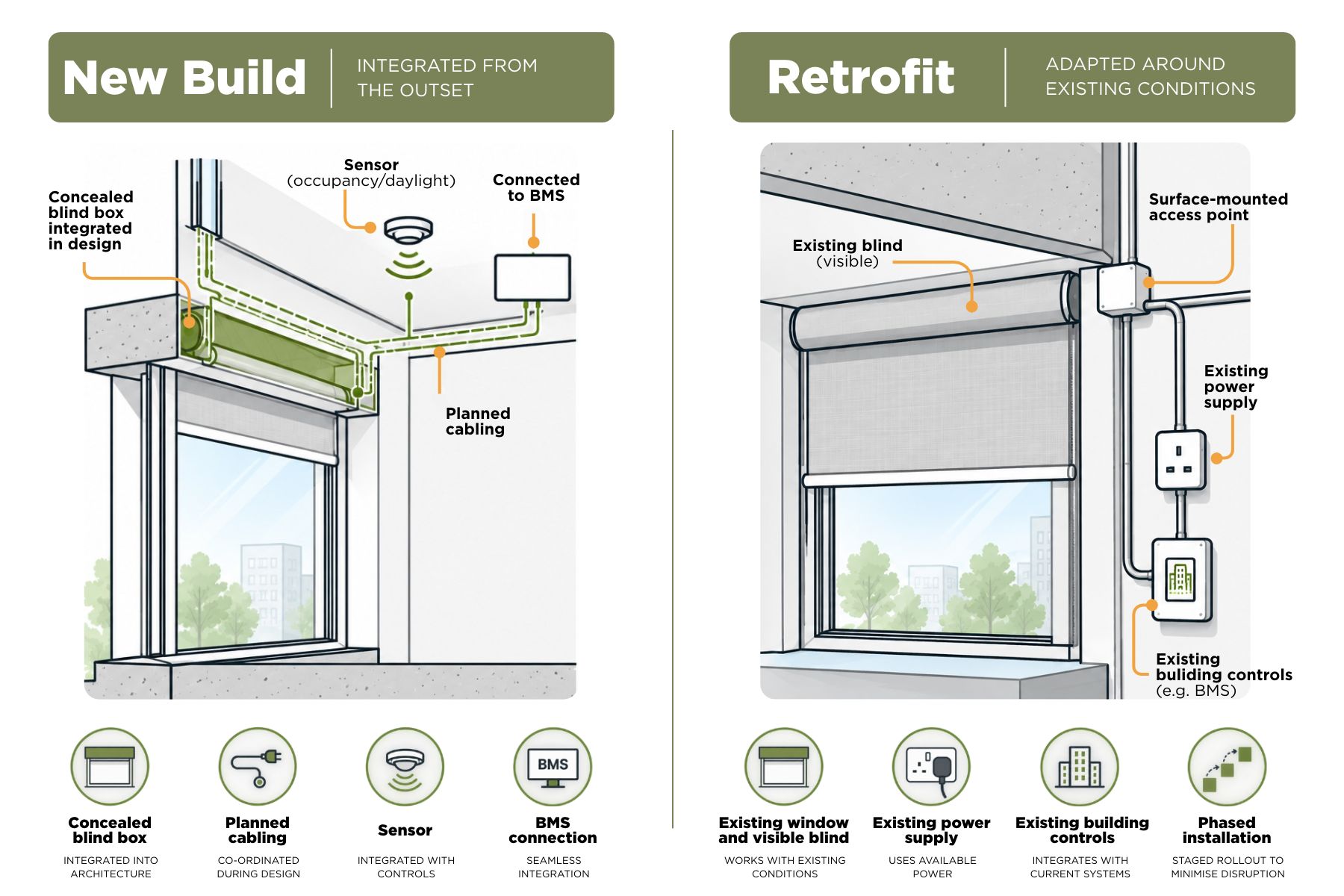
Automated shading can be specified for both new and existing buildings, although the design considerations are different.
In a new build, the shading and controls strategy can be coordinated alongside the façade, electrical services, ceilings and building controls from an early stage.
This gives you more freedom to plan power supplies, cable routes, sensor positions and concealed details such as blind boxes.
Retrofit projects usually start with existing conditions. You may need to work around available power, finished ceilings, existing controls and restricted access.
Depending on the system and project requirements, wireless controls or phased installation may also be considered.
|
New build |
Retrofit |
|---|---|
|
Coordinate shading early with façade and M&E design |
Assess the existing blinds, glazing and controls |
|
Plan power and control requirements before finishes are completed |
Confirm where suitable power is available |
|
Coordinate sensors, zones and controls with the wider building strategy |
Review compatibility with the existing BMS or control system |
|
Integrate blind boxes or recessed details where required |
Work around existing ceilings, finishes and access restrictions |
|
Plan cable routes and containment alongside other services |
Consider wired or suitable wireless control options |
|
Coordinate installation with the construction programme |
Plan phased installation where the building remains occupied |
Early coordination is particularly useful where the blinds are concealed, centrally controlled or connected to other building systems.
If overheating is one of the reasons for upgrading an existing building, our guide to commercial building overheating and solar shading solutions covers shading, glazing and retrofit options in more detail.
When Should Smart Shading Be Considered?
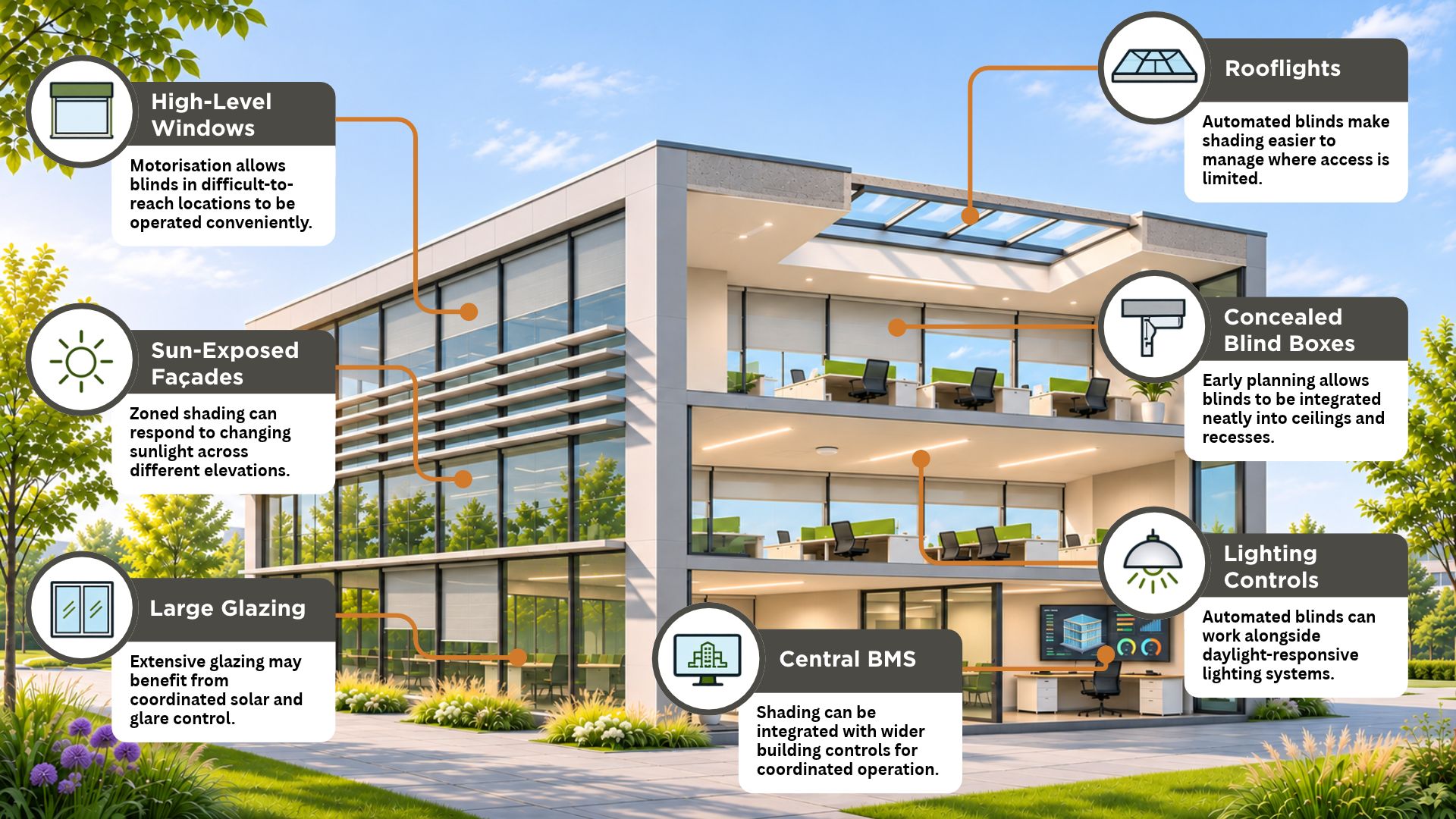
Smart shading should ideally be considered while the façade, electrical services and building controls are still being developed, particularly where motorisation, concealed blinds or BMS integration are planned.
Early consideration gives the design team time to establish how the shading should operate and coordinate the physical and control requirements with other trades.
It is particularly worth considering automated shading where a project includes:
- Glare-sensitive offices, classrooms or meeting spaces
- Façade-based or room-based control zones
- Requirements for BMS or iBMS integration
- High-level or difficult-to-reach windows
- Elevations with high solar exposure
- Central lighting or building controls
- Large numbers of repeated blinds
- Rooflights or atrium glazing
- Concealed blind boxes
- Large glazed façades
The earlier these requirements are defined, the easier it is to coordinate power, controls, access and architectural detailing.
For projects that require central controls or integration with other building systems, we can provide support with automated solar shading specification and BMS integration.
Smart Shading in Practice: Manhattan Loft Gardens
Manhattan Loft Gardens in Stratford provides a useful example of how motorised shading can be coordinated with wider building systems on a large project.
We designed and installed 3,335 blinds across the 42-storey development, including both manual and motorised systems.
A bespoke blind-box solution was developed to integrate the blinds into the architecture while keeping the systems unobtrusive when retracted.
The motorised blinds were also coordinated with the building’s lighting and apartment automation systems. A custom interface allowed communication between the blinds and a DALI lighting module, with two-way communication used within the control arrangement.
The project required close coordination between the blind system, façade, interiors, electrical services and controls.
You can see the full specification and project details in our Manhattan Loft Gardens case study.
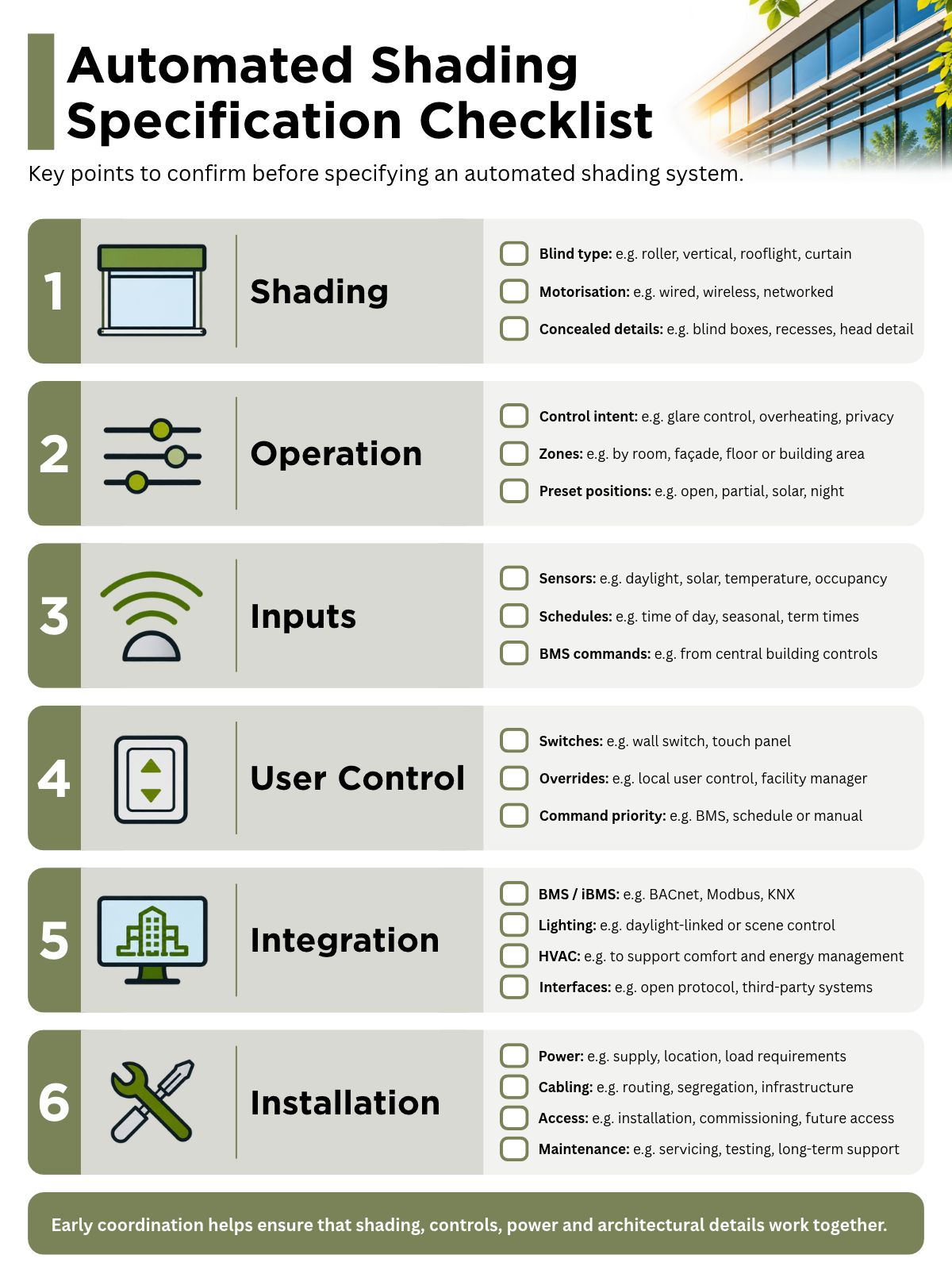
What Should You Confirm Before Specifying Automated Shading?
A clear control brief helps the shading specialist, M&E consultant and controls contractor design systems around the same intended operation.
Before specifying an automated system, confirm:
Shading system
- What type of blind, curtain or shading system is required?
- Which units need to be motorised?
- Are any blinds concealed within boxes, pockets or ceiling details?
Control intent
- What should cause the blinds to move?
- Will blinds operate individually, in groups or by façade?
- Are preset positions required?
- Should different elevations operate independently?
Sensors and automation
- Are solar, light, temperature or occupancy inputs required?
- Are time schedules needed?
- Where will sensors be positioned?
User control
- Will occupants have local switches or controls?
- Are temporary overrides required?
- Which commands should have priority?
Building integration
- Does the shading need to communicate with a BMS or iBMS?
- Will it interact with lighting or HVAC controls?
- What building-control platform and protocols are being used?
- Are controllers, relays, gateways or other interfaces required?
Installation
- Where will power be provided?
- Is suitable containment available?
- Is there enough space for motors and control equipment?
- Can the blinds, motors and controls be accessed for future maintenance?
The final control architecture will depend on the selected shading system, motors, building controls and project requirements.
For detailed support with controls architecture, interfaces, coordination and commissioning, see our BMS blind control and automated solar shading integration service.
Download the Automated Shading Specification Checklist PDF.
Next Steps for Your Project
The right next step depends on whether you are still exploring automated shading, selecting a motorised system or coordinating an active building-controls project.
BMS Blind Control and Automated Solar Shading Integration
For projects where blinds need to connect with central building controls, see our BMS blind control and automated solar shading integration service.
This covers the coordination required around motors, controllers, interfaces, zones, control logic, testing and commissioning.
Commercial Motorised Blinds
If you are choosing the blind system itself, our commercial motorised blinds page covers the motorised blind options we supply and install for commercial projects.
Benefits of Motorised Blinds
If you are still assessing whether motorisation is suitable for your project, read our guide to the benefits of motorised blinds.
Commercial Building Overheating
For projects where solar gain and internal temperatures are the main concern, our guide to controlling overheating in commercial buildings looks at shading, glazing, fabrics and wider solar-control measures.

BMS Integration
For active controls and integration projects.
Motorised Blinds
For selecting commercial blind systems.

Motorisation Guide
For understanding where powered blinds are useful.

Overheating Guide
For solar gain and thermal-control strategies.
Frequently Asked Questions About Smart Blinds and Automated Shading
What is the difference between motorised and automated blinds?
A motorised blind uses an electric motor to move the blind, usually in response to a switch, remote or controller.
An automated blind adds control logic so the blind can respond to inputs such as sensors, schedules or central commands. Automated blinds can operate independently or form part of a wider building-controls system.
How do smart blinds know when to open or close?
Smart blinds respond to predefined control inputs and rules.
Depending on the system, these inputs can include sunlight, internal light levels, temperature signals, occupancy, time schedules, local controls or commands from a BMS.
The controller processes the input and sends the appropriate command to the blind motor or group of motors.
Can smart blinds respond to sunlight?
Yes. Automated shading can use solar or light sensors to trigger a programmed blind position when defined conditions are reached.
For example, blinds on a sun-exposed façade can be controlled separately from blinds on elevations receiving less direct sunlight.
The available functions depend on the sensors, motor system and controls specified for the project.
Can automated blinds work with lighting controls?
Yes, where the controls architecture has been designed to support this.
Shading can manage direct sunlight and glare while lighting controls respond to the remaining available daylight. Technologies such as DALI may form part of this arrangement, depending on the wider lighting and controls strategy.
Our Manhattan Loft Gardens project is one example where motorised blinds were interfaced with a DALI lighting module.
Can occupants override automatic blind controls?
Yes, where local override has been included within the controls design.
A wall switch, control panel or room interface can allow an occupant to adjust the blinds for local conditions or a particular activity.
The project team should establish how local commands interact with automatic controls and central BMS commands, including which control takes priority.
Do smart blinds need a BMS?
No. Automated blinds can operate through local controllers, sensors, timers or grouped controls without being connected to a central BMS.
BMS integration becomes relevant where shading needs to form part of a wider building-control strategy, communicate with other systems or be managed centrally across multiple rooms, floors or façades.
When should automated shading be planned into a building project?
Automated shading should ideally be considered while the façade, electrical services, ceilings and controls strategy are still being developed.
This is particularly important where blinds require concealed boxes, dedicated power, sensors, central controls or BMS integration.
Early coordination gives the project team more flexibility to plan the system around the architecture and other building services.
For enquiries about smart blinds & BMS:
Enviroscreen Systems
Swift House,
13 Ronsons Way,
St Albans,
AL4 9QT
United Kingdom
Telephone: 01727 220 007
E-mail: [email protected]